
Introduction
NETCA (Network Configuration Assistant) is an Oracle utility used to configure network components for Oracle databases. It simplifies the setup and management of network configurations, including creating and managing listener.ora, tnsnames.ora, and other related files. Instead of hand-editing these files directly, NETCA walks you through listener creation with a guided wizard, which reduces the chance of a typo breaking your network configuration. In this guide, we'll walk through creating a listener using the NETCA utility, step by step.
Prerequisites
- Oracle Database software should already be installed.
- Oracle Database environment variables (
ORACLE_HOME,ORACLE_SID, andPATH) should be correctly set for the OS user running NETCA.
Step 1: Launch NETCA
Run netca from the OS prompt as the Oracle software owner. This launches the graphical wizard that walks through the rest of the configuration.
[oracle@target ~]$ netca
Step 2: Walk Through the NETCA Wizard
Once the GUI opens, it walks you through a series of screens for the listener setup. Each screen below explains what to select and why.
Select Listener Configuration and click Next. This tells NETCA you want to create or manage a listener, rather than configure naming methods or a directory service, which are the other options on this screen.

Select Add and click Next. Since no listener exists yet on this server, we choose Add to create a new one rather than reconfigure, delete, or rename an existing listener.

Provide the listener name "LISTENER" and click Next. "LISTENER" is the Oracle default name and what most tools and documentation expect. Stick with this unless you have a specific reason to run multiple named listeners on the same host.

Select the protocol and click Next. TCP/IP is the standard choice for almost all environments unless you have a specific requirement for another protocol.

Provide the port and click Next. Port 1521 is Oracle's standard listener port. Only change it if 1521 is already in use by another listener on the same host, or your organization has a specific port standard.

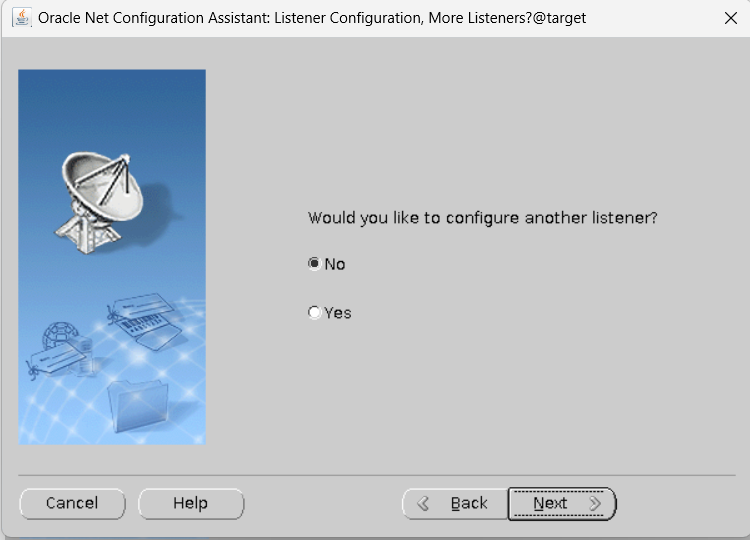
Select No and click Next. This screen asks if you want to configure another listener. Since we're only setting up one, select No to proceed.
Click Next. This screen confirms the listener configuration is complete and ready to be written to disk.

Click Finish. NETCA now writes the listener.ora file to $ORACLE_HOME/network/admin based on the choices made above.

Step 3: Start the Listener
NETCA only creates the configuration file, it doesn't start the listener process automatically. Start it manually and confirm it's running with the following command.
[oracle@target ~]$ lsnrctl start LISTENER
LSNRCTL for Linux: Version 19.0.0.0.0 - Production on 22-JAN-2025 12:09:54
Copyright (c) 1991, 2024, Oracle. All rights reserved.
Starting /u01/app/oracle/product/19.0.0/dbhome_1/bin/tnslsnr: please wait...
TNSLSNR for Linux: Version 19.0.0.0.0 - Production
System parameter file is /u01/app/oracle/product/19.0.0/dbhome_1/network/admin/listener.ora
Log messages written to /u01/app/oracle/diag/tnslsnr/target/listener/alert/log.xml
Listening on: (DESCRIPTION=(ADDRESS=(PROTOCOL=tcp)(HOST=target.localdomain)(PORT=1521)))
Listening on: (DESCRIPTION=(ADDRESS=(PROTOCOL=ipc)(KEY=EXTPROC1521)))
Connecting to (DESCRIPTION=(ADDRESS=(PROTOCOL=TCP)(HOST=target.localdomain)(PORT=1521)))
STATUS of the LISTENER
------------------------
Alias                     LISTENER
Version                   TNSLSNR for Linux: Version 19.0.0.0.0 - Production
Start Date                22-JAN-2025 12:09:54
Uptime                    0 days 0 hr. 0 min. 2 sec
Trace Level               off
Security                  ON: Local OS Authentication
SNMP                      OFF
Listener Parameter File   /u01/app/oracle/product/19.0.0/dbhome_1/network/admin/listener.ora
Listener Log File         /u01/app/oracle/diag/tnslsnr/target/listener/alert/log.xml
Listening Endpoints Summary...
  (DESCRIPTION=(ADDRESS=(PROTOCOL=tcp)(HOST=target.localdomain)(PORT=1521)))
  (DESCRIPTION=(ADDRESS=(PROTOCOL=ipc)(KEY=EXTPROC1521)))
The listener supports no services
The command completed successfully
Notice the output says "The listener supports no services". This is expected at this stage, the listener is running, but no database instance has registered with it yet. Once you start a database instance with dynamic registration enabled (or restart it), it will appear under this listener's services automatically.
Thank you for reading!
I hope this content has been helpful to you. Your feedback and suggestions are always welcome. Feel free to leave a comment or reach out with any queries.
Abhishek Shrivastava
Oracle DBA with hands-on experience managing production Data Guard, RAC, GoldenGate, and APEX environments. I write practical, tested installation and troubleshooting guides based on real deployment work.
Comments
Post a Comment